01 / CARD DOCK
Copy once. Build your backups.
Send a camera card or SSD to a main destination and additional backups. Follow independent progress and transfer speed for each copy.
Less time managing files.
More time making something that matters.
Bring your footage home.
With every copy checked.
A practical tool for camera-media imports, verified backups and a more organised start to your edit.
Download for MacFree beta · Not notarized by Apple. Read installation guidance.
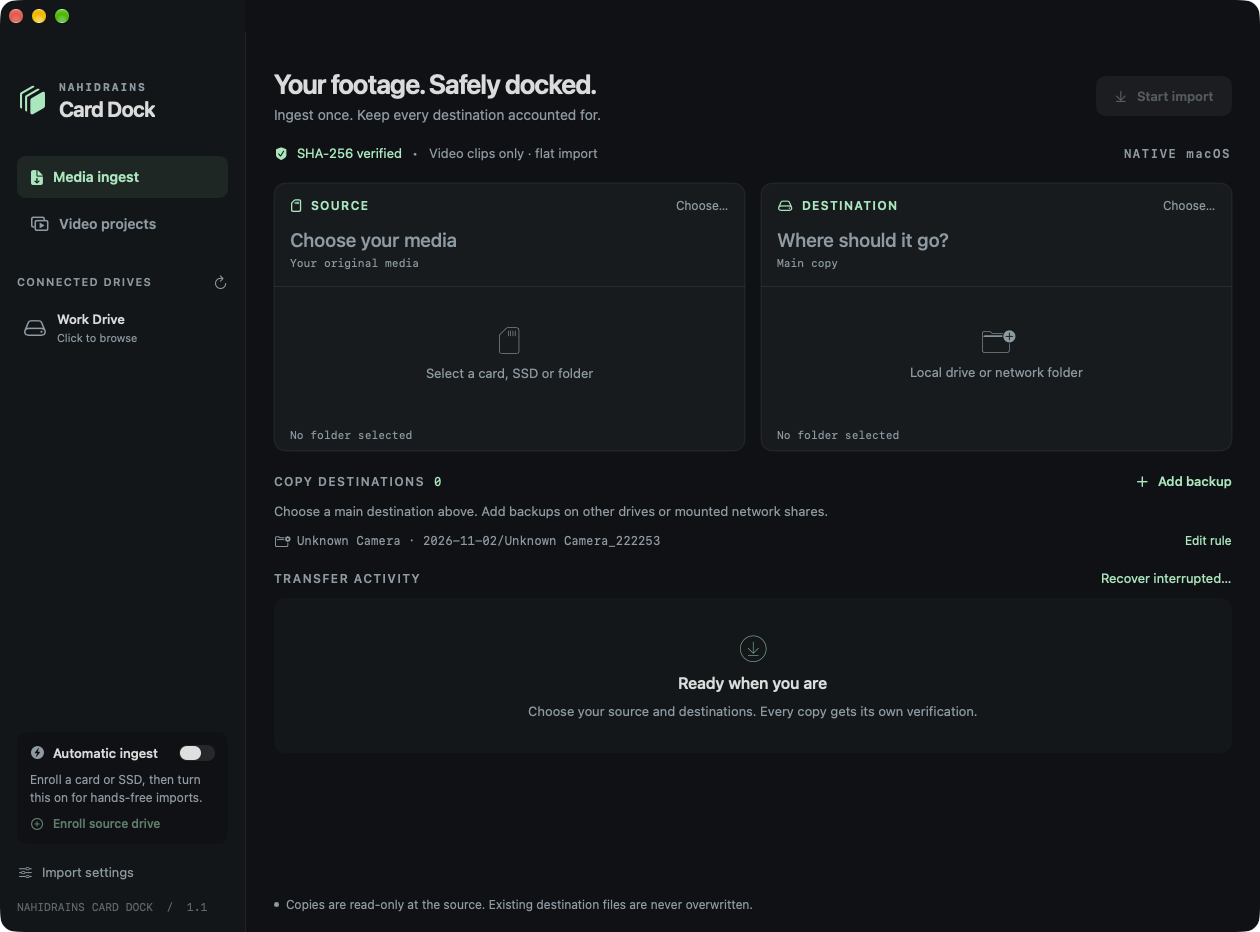
Send a camera card or SSD to a main destination and additional backups. Follow independent progress and transfer speed for each copy.
Card Dock hashes the source with SHA-256 and rereads the destination before confirming a verified copy. Each completed import gets a verification receipt.
Create dated folders with camera names, use per-card overrides, and choose a flat video import or the original folder structure.
Recheck completed files and recover eligible interrupted sessions without silently trusting partial copies.
Enroll your cards and enable automatic importing when they are mounted, while Card Dock is running.
Organise links into named projects and download media you own or have permission to use, using optional helpers.
Open Card Dock and select your camera card or SSD as the source. Confirm the files you want to import.
Select a main destination and any backup destinations. Check free space and your folder naming template.
Start the import. Leave the source and destinations connected while Card Dock copies and rereads the files.
Wait for successful verification and the completion receipt on each required copy. Keep your originals until the copies are independently checked.
Download the ZIP, extract it, and move NahidRains Card Dock.app into Applications. This release is for Apple silicon Macs.
This build is locally signed and not notarized by Apple. If macOS blocks it and you choose to trust this download, try opening it once, then look for the app in System Settings → Privacy & Security → Open Anyway. Follow Apple’s instructions and review the app name before confirming.
Read Apple’s guidance on opening downloaded apps ↗Compare your downloaded ZIP with this release fingerprint.
81102d7fcfaa5b84d2bd0246a9408b6b9b7a79d7fce59116be87001662075b9aYes. Download this beta directly, with no payment, account or email sign-up.
This download is built for Apple silicon Macs (M1 or later) and targets macOS 14 Sonoma or later. It is not an Intel or Windows build. The release was tested on the developer’s Mac; every supported macOS version has not been tested.
This beta is ad-hoc signed and has not been notarized by Apple. macOS cannot verify its developer or check its notarization. Read the installation guidance below before deciding whether to open it.
No. The import engine copies file contents and verifies them. It does not erase your source card or transcode your camera footage. Keep the source until every required copy has been independently verified.
Yes. Select mounted local drives or network folders as destinations. Each destination has its own copy and verification status. Actual speed depends on your hardware and connection; live NAS disconnect/reconnect has not been tested.
Use Retry / recover for a failed destination or Recover interrupted… after restarting. Recovery rechecks source and completed destination files. Unfinished files restart from the beginning; recovery is not byte-by-byte resume.
No. Video-only mode finds supported video files in subfolders and flattens them into an import folder. Choose all-files mode to include photos, sidecars and other regular files while preserving the folder hierarchy.
Enroll a source card or SSD and enable Automatic ingest. Card Dock must remain running; it does not launch itself at login. Reformatting a card may require enrollment again.
A separate workspace for organising video links into projects and downloading permitted media. Optional download helpers are installed separately. Highest-available downloads may use MKV or codecs that your editor cannot open. Site support can change; DRM and private-video restrictions are not bypassed.
Use the Business Enquiry form on the main website and mention Card Dock, your app version, macOS version and what happened. Do not send private footage or sensitive logs. This is a beta with no guaranteed support response time.
Share what works, what could be better, or how Card Dock fits into your editing workflow.
Explore free DaVinci Resolve learning resources, or get in touch about Card Dock.